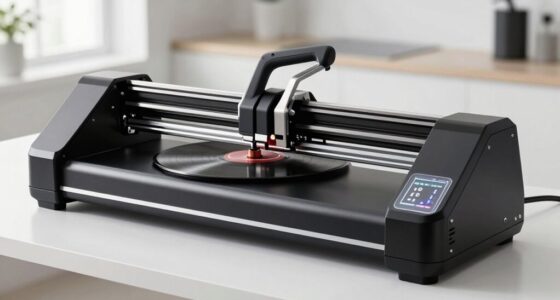
Starting with an electronic cutting machine can open up endless creative possibilities, but choosing the right one as a beginner can be overwhelming. The Brother SDX125EGY ScanNCut stands out as the best overall for its user-friendly features and reliable performance. For those prioritizing portability, the Cricut Joy offers a compact design with excellent versatility, while the Cricut Explore 5 provides a comprehensive bundle for expanding craft options. The main tradeoffs include balancing features like built-in scanners and cutting size against ease of use and price. Keep reading to see how these options compare and find the best fit for your crafting needs.

Get tools and workshop supplies delivered free — and shop member deals
- Fast, free delivery on millions of items
- Access to Prime Big Deal Days deals on October 6–7
- Prime Video, Amazon Music and more included
Complete the kit


Key Takeaways
- The best overall picks combine ease of use with versatile features like scanning and a range of materials.
- Compact machines like the Cricut Joy excel for small projects and limited space but may lack larger cutting sizes.
- Bundled options often include digital content and accessories, offering better value for beginners investing in multiple crafts.
- Built-in scanners can add convenience but often come at a higher price and complexity, which may overwhelm new users.
- Price and size are key tradeoffs—more features generally mean a larger investment and a steeper learning curve.
| Brother SDX125EGY ScanNCut Electronic Cutting Machine Grey |  | Best Overall for Versatile DIY and Small Business Use | Material Thickness: up to 3 mm | Designs Included: 682 | Built-in Fonts: 9 | VIEW ON AMAZON | See Our Full Breakdown |
| Cricut Explore 5 Essential Bundle + Digital Content, Taupe | 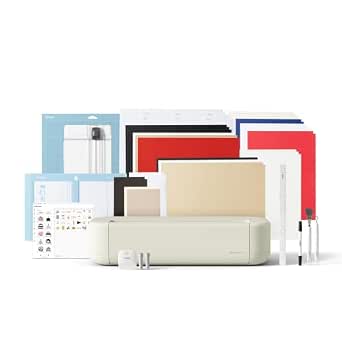 | Best for Versatile Materials and Compact Crafting | Cutting Size: 12 inches | Material Compatibility: Vinyl, iron-on, cardstock, printable materials, foam, rubber | Included Content: Smart Vinyl, Smart Iron-On, Value Cardstock, Insert Card Sets, Printable Vinyl, 25 premium images, 1 font | VIEW ON AMAZON | See Our Full Breakdown |
| Brother SDX125E ScanNCut Electronic Cutting Machine |  | Best for Digital Scanning and Custom Design Conversion | Material Cutting Thickness: 3mm | Built-in Designs: 682 | Included Accessories: 12″ x 12″ tack mat, black pen, pen holder, touch pen, spatula, accessory pouch, pattern collection, auto blade, sample cardstock | VIEW ON AMAZON | See Our Full Breakdown |
| Cricut Joy Machine & Digital Content Library Bundle |  | Best for Portable, On-the-Go Crafting | Weight: 3.9 lbs | Material Compatibility: 50+ including cardstock, vinyl, iron-on | Connectivity: Wireless Bluetooth | VIEW ON AMAZON | See Our Full Breakdown |
| CraftGenes A4 Electric Die Cutting and Embossing Machine, 9-Inch, 200W |  | Best for Larger Projects and Ease of Use | Power: 110V | Motor: 200W | Format: A4 | VIEW ON AMAZON | See Our Full Breakdown |
| Electronic Die Cutting Machine for Cardmaking, 9-Inch Opening |  | Best Overall for Versatile Hobbyists | Brand: Genron Craft | Model: Fabric Cutting Machine | Power Supply: 110V US Plug | VIEW ON AMAZON | See Our Full Breakdown |
| Cricut Maker 4 Card Making Bundle – Smart Cutting Machine with Card Mat, Card Inserts & Materials for Greeting Cards, Invitations & Paper Crafts |  | Best All-In-One Kit for Creative Beginners | Brand: Cricut | Model: z20-11084-N8 | Unit Count: 1 | VIEW ON AMAZON | See Our Full Breakdown |
| Brother ScanNCut DX SDX85 Electronic Cutting Machine with Built-in Scanner |  | Best for Custom Design Creation with Scanning | Material Cutting Thickness: up to 3mm | Built-in Designs: 251 | Display: None | VIEW ON AMAZON | See Our Full Breakdown |
| Brother CM350 Electronic Cutting Machine with 4.85″ LCD Touch Screen and 300 DPI Scanner |  | Best for Standalone Design and Editing | Screen Size: 4.85 inches | Scanner Resolution: 300 DPI | Cutting Area: 12 x 12 inches | VIEW ON AMAZON | See Our Full Breakdown |
| Automatic A4 9-inch Die Cutting & Embossing Machine for Cardmaking |  | Best Portable Versatile Die Cutter | Size: A4 9 inch | Material Compatibility: Paper, cardstock, crepe paper, thin fabrics | Accessories: Complete embossing die-cutting kit | VIEW ON AMAZON | See Our Full Breakdown |
| Electric A4 Die Cutting & Embossing Machine for Arts & Crafts, Scrapbooking & Cardmaking, 9” Opening (110V with US Plug) |  | Best for Power and Versatility in Portable Cutting | Size: 10.2 x 5.9 x 8.3 inches | Opening: 9 inches | Voltage: 110V | VIEW ON AMAZON | See Our Full Breakdown |
| Cricut Explore 5 Essential Bundle + Rainbow Sampler |  | Best for Versatile, Space-Saving Cutting with Extensive Material Support | Material Compatibility: Over 100 including vinyl, HTV, cardstock, printable vinyl, felt | Connectivity: Bluetooth | Machine Size: 30% more compact than previous models | VIEW ON AMAZON | See Our Full Breakdown |
| Cricut Joy Smart Cutting Machine with Writable Vinyl Starter Kit |  | Best for On-the-Go Personalization and Compact Crafts | Brand: Cricut | Model: 8002284 | Unit Count: 1 | VIEW ON AMAZON | See Our Full Breakdown |
More Details on Our Top Picks
Brother SDX125EGY ScanNCut Electronic Cutting Machine Grey
The Brother SDX125EGY ScanNCut stands out for its built-in scanner, making it ideal for users who want to create custom designs from hand-drawn art or printed images. Compared to the Cricut Explore 5, it offers more creative flexibility through its scanning capability, though it is limited to cutting materials up to 3mm thick. Its large library of 682 designs and automatic material sensing streamline the crafting process, especially for hobbyists and small-scale entrepreneurs. However, it requires some trial and error to perfect cuts, and it operates only on US 120V power. This model is best suited for those who value customization and quiet operation at home, but less so for users needing to cut thicker materials or working outside the US electrical standards.
Pros:- Built-in scanner for personalized designs
- Large selection of 682 designs and 9 fonts
- Automatic material sensing simplifies setup
- Quiet operation suitable for home environments
Cons:- Limited to 3mm material thickness, restricting projects
- Requires trial cuts for optimal results
- Designed exclusively for US 120V outlets
Best for: Hobbyists and small entrepreneurs who want to scan and cut custom designs at home
Not ideal for: Users needing to cut thicker materials or working outside US voltage standards
- Material Thickness:up to 3 mm
- Designs Included:682
- Built-in Fonts:9
- Touchscreen:5 inches
- Included Accessories:12″ x 12″ tack mat, black pen, pen holder, touch pen, spatula, pattern collection, auto blade, auto blade holder, sample cardstock
- Power:120V
Our verdict“This machine is perfect for creative hobbyists and small-scale users who prioritize design flexibility and quiet operation within US standards.”
Cricut Explore 5 Essential Bundle + Digital Content, Taupe
The Cricut Explore 5 offers a compact, stylish design that’s well-suited for creating decals, apparel, and stickers. Compared with the Brother SDX125EGY, it provides a broader range of materials—over 100—including vinyl, iron-on, and printable sheets—making it more adaptable for various projects. Its Bluetooth connectivity and included content library enable easy design transfer and quick start-up, ideal for crafters who want a flexible, portable option. However, its tools and some accessories are sold separately, and it’s less capable of handling larger or thicker projects due to its 12-inch cutting limit. This pick is best for hobbyists seeking a versatile machine that fits into small spaces and supports a wide array of materials, but less so for those requiring thicker or larger-scale cuts.
Pros:- Compact, stylish design in trendy taupe color
- Compatible with over 100 materials for diverse projects
- Includes extensive content library and bundle of tools
- Wireless Bluetooth makes setup and design transfer easy
Cons:- Tools and some accessories sold separately
- Requires a compatible device and internet connection
- Limited to small projects due to 12-inch cut size
Best for: Casual crafters and small project enthusiasts who need portability and material versatility
Not ideal for: Users requiring larger cuts or working with thicker materials regularly
- Cutting Size:12 inches
- Material Compatibility:Vinyl, iron-on, cardstock, printable materials, foam, rubber
- Included Content:Smart Vinyl, Smart Iron-On, Value Cardstock, Insert Card Sets, Printable Vinyl, 25 premium images, 1 font
- Connectivity:Bluetooth
- System Requirements:Compatible computer or mobile device with Bluetooth and high-speed internet
- Project Size:4 in x 6 in
Our verdict“This machine is ideal for hobbyists who want a stylish, versatile, and portable cutter for small to medium projects with easy connectivity.”
Brother SDX125E ScanNCut Electronic Cutting Machine
The Brother SDX125E ScanNCut closely resembles the B08D6YK8BX but focuses on converting hand-drawn or printed designs into cut files via its built-in scanner. Compared to the Cricut Explore 5, it provides more creative freedom through scanning, though it shares the same material thickness limit of 3mm. Its wireless capability adds convenience for modern crafting setups, and with 682 built-in designs, it balances ready-to-use options with custom design flexibility. A key consideration is that it may require multiple trial cuts for best results, and its US-only voltage makes it less portable internationally. This is best for users who want to incorporate scanned artwork into their projects and prefer a dedicated, quiet machine for home use, but less ideal for those needing thicker material handling or international compatibility.
Pros:- Built-in scanner for custom design creation
- Large library of 682 designs and fonts
- Automatic material sensing simplifies setup
- Wireless connectivity for convenience
Cons:- Limited to 3mm material thickness
- May need multiple trial cuts for perfect results
- Designed primarily for US electrical standards
Best for: Crafters interested in scanning and digitizing hand-drawn or printed designs for detailed projects
Not ideal for: International users outside the US or those needing to cut thicker materials
- Material Cutting Thickness:3mm
- Built-in Designs:682
- Included Accessories:12″ x 12″ tack mat, black pen, pen holder, touch pen, spatula, accessory pouch, pattern collection, auto blade, sample cardstock
- Display:5-inch touchscreen LCD
- Connectivity:USB, wireless
- Power:120V US
Our verdict“This model suits creative users who want to scan and digitize their artwork within a quiet, home-friendly device, but is less flexible for thicker materials or international use.”
Cricut Joy Machine & Digital Content Library Bundle
The Cricut Joy offers a highly portable solution for quick and simple projects, making it perfect for crafters who need to create on the move. Its lightweight design at just 3.9 lbs allows for easy transport, and it supports cutting over 50 materials with precision. Unlike larger machines such as the Brother SDX125EGY, it’s designed for small-scale projects like labels, stickers, and cards. The wireless Bluetooth connection simplifies design transfer from mobile devices, and the included digital library provides plenty of inspiration. However, its small size limits the scope of projects, and users will need a smartphone or computer for designing. This pick is best for hobbyists or parents who want a quick, portable device for small crafts, but less suitable for larger or complex projects requiring bigger cuts or multiple materials.
Pros:- Extremely portable and lightweight
- Supports over 50 materials with high precision
- Wireless Bluetooth for seamless design transfer
- Includes a digital library and free Cricut Access trial
Cons:- Limited to small projects due to size
- Requires a device for design creation
- Additional accessories may be needed for advanced use
Best for: Crafters seeking a compact, portable machine for quick, small-scale projects
Not ideal for: Users needing larger cuts or working on bigger projects regularly
- Weight:3.9 lbs
- Material Compatibility:50+ including cardstock, vinyl, iron-on
- Connectivity:Wireless Bluetooth
- Included Content:30 images, blade and housing, fine point black pen, StandardGrip mat, welcome card, power adapter, 50 projects, free Cricut Access trial
- Cutting Support:Over 50 materials
- Project Size Limit:Small
Our verdict“This machine is ideal for hobbyists and parents who want a compact, easy-to-use cutter for quick, small projects anytime, anywhere.”
CraftGenes A4 Electric Die Cutting and Embossing Machine, 9-Inch, 200W
The CraftGenes A4 Electric Die Cutting and Embossing Machine simplifies crafting with its automatic feed sensors and a robust 200W motor. Compared to the Brother SDX125EGY and other smaller machines, its larger 9-inch (220mm) opening allows for bigger projects like larger cards and scrapbook pages, which is a significant advantage. The included starter kit with various plates, embossing folders, and die sets makes it ready for diverse crafting needs. However, it requires a 110V power supply, limiting portability outside the US, and some users report inconsistent feeding, which can affect project quality. This machine makes the most sense for dedicated hobbyists or small business owners focused on larger projects who prioritize ease of operation, but less so for portable crafting or international users.
Pros:- Automatic feed sensors improve ease of use
- Includes a comprehensive starter kit for various projects
- Large 9-inch opening supports bigger projects
- 200W motor provides strong cutting power
Cons:- Requires 110V power, limiting portability
- No manual backup option if electric fails
- Inconsistent feeding reported by some users
Best for: Serious hobbyists or small business owners working on larger cards and scrapbooking projects
Not ideal for: International users outside the US or those needing a portable, manual backup option
- Power:110V
- Motor:200W
- Format:A4
- Opening Width:220 mm
- Included Components:C plate, 2 B plates, embossing folders, die sets, stamp set, magnetic sheet, silicone mat, plastic shim, cardstock sheets
- Customer Feedback:Inconsistent feeding reported
Our verdict“This machine is well-suited for dedicated crafters who focus on larger projects and want a fully automated experience, but not for those who need portability or international compatibility.”
Electronic Die Cutting Machine for Cardmaking, 9-Inch Opening
This electric die cutting and embossing machine from Genron Craft stands out for its large 9-inch opening, making it ideal for A4-sized projects and larger craft tasks. Its automatic operation ensures smooth, consistent cuts, which is especially helpful for beginners who want reliable results without hassle. Compared with the Brother ScanNCut DX SDX85, it offers a more straightforward user experience for basic cardmaking and embossing, though it lacks built-in scanning. The limited to 110V power restricts international use, and with only 50 included accessories, additional purchases may be necessary for full versatility. This model is perfect for hobbyists and small-scale crafters seeking an easy-to-use machine that handles both cutting and embossing with minimal fuss.
Pros:- Automatic operation for consistent, smooth cuts
- Large 9-inch opening suitable for A4 paper and big projects
- Compatible with various embossing folders and dies
- User-friendly for beginners and experienced crafters
Cons:- Limited to 110V power supply, restricting international use
- Only 50 included items, may require additional accessories
Best for: Beginners and hobbyists who want a reliable, all-in-one machine for cardmaking and embossing at home.
Not ideal for: International users or those seeking a broad range of pre-loaded designs without extra accessories, due to voltage restrictions and limited included items.
- Brand:Genron Craft
- Model:Fabric Cutting Machine
- Power Supply:110V US Plug
- Included Components:cardstock, embossing folder, die cut, cutting plates
- UPC:741418897034
- Number of Items:50
Our verdict“This machine is a strong choice for beginners who prioritize ease of use and versatility in cardmaking and embossing.”
Cricut Maker 4 Card Making Bundle – Smart Cutting Machine with Card Mat, Card Inserts & Materials for Greeting Cards, Invitations & Paper Crafts
The Cricut Maker 4 Card Making Bundle offers a comprehensive setup that’s ideal for those new to paper crafting, providing mats, cardstock, inserts, and sampler materials. Its user-friendly design and intuitive software make creating layered, intricate cards accessible even to absolute beginners. Compared to the Brother CM350, which features a smaller screen and less variety, this bundle provides more tools and materials to jump-start projects. However, the higher price point and dependence on Cricut Design Space software might deter casual users or those less comfortable with digital design. This pick makes the most sense for hobbyists eager to produce professional-looking greeting cards and invitations from the start.
Pros:- All-in-one kit with mats, cardstock, and sampler materials
- Suitable for beginners with easy setup and user-friendly software
- Creates professional-quality, layered, intricate paper crafts
- Includes tools and materials for a variety of projects
Cons:- May be expensive for infrequent or casual hobbyists
- Requires familiarity with Cricut Design Space software
Best for: Beginners interested in creating detailed, layered paper crafts with minimal setup complexity.
Not ideal for: Casual crafters or those who prefer simpler, manual tools, as this bundle requires some familiarity with digital design software.
- Brand:Cricut
- Model:z20-11084-N8
- Unit Count:1
- Warranty:1 Year
- Included Components:Cricut Maker 4 Ultimate Card Making Bundle with Variety Materials
Our verdict“This bundle is an excellent choice for beginners wanting a versatile, ready-to-use system for professional-looking paper projects.”
Brother ScanNCut DX SDX85 Electronic Cutting Machine with Built-in Scanner
The Brother ScanNCut DX SDX85 integrates a built-in scanner that enables users to convert their drawings into cut files, making it highly suitable for those who want to customize designs or digitize hand-drawn artwork. Its 251 built-in designs and wireless connectivity support creative flexibility. Compared with the Brother CM350, which has a smaller screen and no scanner, the SDX85 offers more advanced features for those interested in scanning and customizing designs. However, it is limited to 120V power, making it unsuitable for international use without a converter. Its automatic material sensor simplifies setup but may require trial cuts, which can slow initial projects. This machine fits hobbyists who want to expand their creative options through scanning and digital design integration.
Pros:- Built-in scanner for converting drawings to cut files
- Includes 251 built-in designs and wireless connectivity
- Automatic material sensor for easy operation
- Capable of cutting a variety of materials up to 3mm thick
Cons:- Limited to 120V US voltage, not suitable for international use
- Requires trial cuts to ensure successful operation
Best for: Beginners eager to explore custom design creation and scanning, especially those with some digital familiarity.
Not ideal for: International users or those seeking a straightforward, scanner-free, entry-level machine, due to voltage and complexity.
- Material Cutting Thickness:up to 3mm
- Built-in Designs:251
- Display:None
- Connectivity:USB and wireless
- Voltage:120V
Our verdict“Ideal for beginners interested in customizing designs through scanning and digital features, despite some setup learning curve.”
Brother CM350 Electronic Cutting Machine with 4.85″ LCD Touch Screen and 300 DPI Scanner
The Brother CM350 ScanNCut2 features a sizable 4.85-inch LCD touchscreen, making design navigation and editing straightforward for beginners. Its 300 DPI scanner allows for creating custom designs from images, a feature that appeals to users who want to personalize projects without complex software. Compared to the SDX85, the CM350 offers a larger screen and more on-device editing options, though it requires an activation card for wireless use and is limited to Windows OS. While its 12×12 inch cutting area supports a good range of projects, some setup steps may be manual, and wireless features need extra components. This device suits hobbyists wanting to combine scanning with easy editing in a standalone machine.
Pros:- Large 4.85-inch LCD touchscreen for easy design control
- Built-in 300 DPI scanner for creating custom designs
- Can operate standalone or connect to a PC
- Good-sized 12 x 12 inch cutting area
Cons:- Wireless connectivity requires an extra activation card
- Limited to Windows OS, reducing flexibility for Mac users
- Some features may need manual setup
Best for: Beginners who want an all-in-one device with a large display for creating and editing custom designs easily.
Not ideal for: Users who lack familiarity with Windows or want a fully wireless, plug-and-play experience without additional activation cards.
- Screen Size:4.85 inches
- Scanner Resolution:300 DPI
- Cutting Area:12 x 12 inches
- Connectivity:Wireless, USB
- Compatible OS:Windows Vista to 10
Our verdict“Great for beginners who want a sizable screen and integrated scanning with on-device editing, especially on Windows platforms.”
Automatic A4 9-inch Die Cutting & Embossing Machine for Cardmaking
This portable electric die cutting and embossing machine offers a combination of versatility and ease of use, suitable for hobbyists and gift-givers. Its 9-inch A4 size handles a variety of materials, including paper, cardstock, and thin fabrics, making it a flexible choice for small projects. Compared with the Genron Craft model, it emphasizes portability and a complete accessory kit for various craft needs. The lack of detailed specifications on included tools suggests a learning curve for beginners unfamiliar with die-cutting techniques. No price info makes comparison difficult, but its portability and compatibility with major dies make it appealing for those who need a versatile, on-the-go machine.
Pros:- Versatile for die-cutting and embossing projects
- Compatible with major brand dies and folders
- Portable and easy to carry
Cons:- May require some learning curve for complete beginners
- Limited to materials suitable for thin fabrics and paper
- No detailed info on included accessories
Best for: Beginner crafters who want a portable, all-in-one die cutting and embossing machine for small projects and gift-making.
Not ideal for: Those seeking a machine specifically for thick materials or larger scale projects, due to its focus on thin papers and fabrics.
- Size:A4 9 inch
- Material Compatibility:Paper, cardstock, crepe paper, thin fabrics
- Accessories:Complete embossing die-cutting kit
- Portability:Yes
- Power Source:Electric
Our verdict“Ideal for beginners wanting a portable, multi-purpose machine for small-scale die-cutting and embossing tasks.”
Electric A4 Die Cutting & Embossing Machine for Arts & Crafts, Scrapbooking & Cardmaking, 9” Opening (110V with US Plug)
This electric die cutting and embossing machine stands out for its strong pressure and comprehensive accessory set, making it a solid choice for those who want professional-quality results without a bulky setup. Compared with the Cricut Joy, it offers more power and versatility, especially for embossing and thicker materials, but it is less compact and relies on an electrical outlet, limiting portability. The included plates, mats, and accessories support a wide range of arts and crafts projects, and its sturdy build promises durability over time. However, the machine’s size and need for power make it less suited for small, on-the-go craft stations. It’s perfect for dedicated craft spaces where power and variety matter most.
Pros:- Powerful electric operation for fast, consistent cutting and embossing
- Includes a wide range of accessories for diverse crafting techniques
- Sturdy construction ensures durability for frequent use
- Designed for professional-quality results
Cons:- Size and weight may be cumbersome for small craft spaces
- Requires an electrical outlet, reducing portability
- Limited to A4 size projects, restricting larger designs
Best for: Craft enthusiasts who need a powerful, versatile machine with professional results in a dedicated workspace
Not ideal for: Crafters with limited space or those who prefer portable, cordless options like the Cricut Joy
- Size:10.2 x 5.9 x 8.3 inches
- Opening:9 inches
- Voltage:110V
- Power Source:US Plug
- Included Accessories:A4 cardstock, die cuts, embossing folders, clear stamps, plates, silicone mat, magnet sheet
Our verdict“This machine suits advanced hobbyists or small businesses prioritizing power and versatility over portability.”
Cricut Explore 5 Essential Bundle + Rainbow Sampler
The Cricut Explore 5 Essential Bundle makes a compelling choice for beginners seeking a compact, user-friendly device that can handle over 100 materials with precision. Compared to the larger, more powerful Electric A4 machine, it sacrifices some pressure and embossing capabilities for ease of use and space efficiency, making it ideal for smaller craft areas. Its Bluetooth connectivity and extensive library of design resources streamline the crafting process, especially for those new to digital design. However, the reliance on Bluetooth setup and software can pose a learning curve, and the machine is limited to materials compatible with Cricut’s ecosystem. This pick is best for hobbyists who value versatility and space savings over industrial strength or embossing features.
Pros:- Supports cutting over 100 materials with high precision
- Compact, space-saving design ideal for small craft areas
- Includes a variety of digital resources and materials for immediate use
- Bluetooth connectivity facilitates easy setup and wireless operation
Cons:- Limited to materials compatible with Cricut machines, restricting some advanced projects
- Software setup and Bluetooth connection may challenge new users
- Less suitable for thick or rigid materials needing high pressure
Best for: Beginners who want an easy-to-use, all-in-one cutting solution with broad material compatibility and minimal footprint
Not ideal for: Crafters planning to work with very thick or rigid materials that require higher pressure, or those who prefer standalone machines without digital setup
- Material Compatibility:Over 100 including vinyl, HTV, cardstock, printable vinyl, felt
- Connectivity:Bluetooth
- Machine Size:30% more compact than previous models
- Cutting Length:Up to 12 feet with Smart Materials
- Included Materials:Smart Vinyl, Smart Iron-On, Value Cardstock, Printable Vinyl
- Project Library:Over 400 projects and tutorials
Our verdict“This machine excels for beginners seeking versatility and convenience in a compact, digital crafting tool.”
Cricut Joy Smart Cutting Machine with Writable Vinyl Starter Kit
The Cricut Joy Smart Cutting Machine is tailored for those who prioritize portability and quick, personalized projects. Compared with larger machines like the Cricut Explore 5, its small footprint and matless, direct-to-material writing and cutting capabilities make it ideal for on-the-go crafting and simple projects. It excels at creating labels, decals, and small personalized items, supported by its writable vinyl and digital content. However, its limited material compatibility and reliance on digital registration can be drawbacks for more complex or larger projects. This model fits best for crafters who want a sleek, portable device for quick, everyday personalization tasks rather than extensive or heavyweight craft projects.
Pros:- Compact and lightweight for crafting anywhere
- Includes writable vinyl, tools, and digital images for versatile projects
- Capable of precise cuts and writing on over 50 materials
- Matless cutting simplifies setup and storage
Cons:- Limited to specific materials supported by Cricut
- Requires digital registration and software setup, which may be complex for some
- Not suitable for large or heavy-duty projects
Best for: Crafters needing a portable, easy-to-use machine for quick, personalized projects in small spaces
Not ideal for: Those wanting to work with thick materials or large-scale designs, or who prefer standalone, non-digital devices
- Brand:Cricut
- Model:8002284
- Unit Count:1
- Included Components:Cricut Joy smart cutting machine, Card Machine Mat, Writable Vinyl, Fine Point Pen, Tools, 30 digital images
- Material Compatibility:Cardstock, vinyl decal, iron-on, Smart Material
- Features:Portable, cuts 50+ materials, writes directly on vinyl, matless cutting
Our verdict“This machine suits crafters seeking a portable, straightforward device for quick, personalized creations on the go.”

How We Picked
I evaluated each electronic cutting machine for beginners based on ease of setup, user-friendliness, versatility, build quality, and included features. Machines with intuitive interfaces and helpful tutorials ranked higher, as these reduce the learning curve for newcomers. I also considered the range of compatible materials, cutting size, and digital content to ensure options suit various beginner projects. Cost was a factor, but only when it aligned with delivering value and reliability. The products are ranked to reflect the best combination of simplicity, features, and overall value for someone new to electronic cutting machines.Factors to Consider When Choosing Electronic Cutting Machine For Beginners
Choosing the right electronic cutting machine as a beginner involves balancing several factors. Ease of use is paramount, so look for models with straightforward controls and helpful tutorials. Versatility matters too—consider what materials and projects you want to explore, and whether the machine can handle those needs. Size and portability are important if space is limited or if you plan to move your machine around. Additionally, digital content and bundled accessories can add value, especially for those just starting out. Finally, weigh the cost against what features are essential for your crafting goals to avoid overspending on unnecessary functions.Ease of Use and Learning Curve
For beginners, a machine with an intuitive interface, clear instructions, and helpful tutorials can make a significant difference in how quickly you become comfortable. Look for models with touchscreens or simplified controls, as these reduce frustration and speed up the learning process. Avoid overly complex machines that require extensive setup or technical knowledge, as they can hinder your initial experience and dampen enthusiasm.
Versatility and Material Compatibility
Consider what types of projects and materials you want to work with, such as paper, vinyl, fabric, or leather. Machines with a broader material compatibility open more creative possibilities and reduce the need for additional tools. Keep in mind that some models are better suited for specific crafts—like card making or home decor—so matching the machine to your primary interests ensures long-term satisfaction.
Size, Portability, and Workspace Needs
Evaluate the physical dimensions and weight of the machine, especially if space is limited or if you need to transport it frequently. Compact models like the Cricut Joy excel in small spaces and are easy to store but typically have smaller cutting areas. Conversely, larger machines can handle bigger projects but require dedicated space and may be less convenient for casual or mobile use.
Included Features and Digital Content
Bundled digital content, such as design libraries, fonts, and projects, can significantly enhance your initial experience. Machines with built-in scanners or compatibility with design software also add convenience, allowing for custom designs and precise cuts. Balance these extras against the overall cost to determine if they provide good value for your specific crafting aspirations.
Budget and Future Expansion
While it might be tempting to choose the cheapest option, investing a bit more in a versatile, high-quality machine can pay off in the long run. Consider your budget, but also think about potential upgrades or additional tools you might want later. A slightly higher initial investment may provide better durability, more features, and a more satisfying crafting experience, especially as your skills grow.
Frequently Asked Questions
Can I use a beginner electronic cutting machine for professional projects?
While beginner models are designed for ease of use and basic projects, they can handle simple professional tasks if the volume and complexity are limited. However, for frequent or highly detailed professional work, investing in a more advanced machine with higher precision, larger cutting areas, and additional features is advisable. Starting with a beginner machine allows you to learn the basics before upgrading to a more robust model as your skills and needs evolve.
Are bundled digital content and accessories worth paying extra for?
Bundled digital content and accessories can add significant value, especially for beginners who want immediate access to designs and materials. These bundles often include design libraries, templates, and starter kits that help you get started quickly. However, if you already have access to digital design platforms or specific materials, you might prioritize a simpler model without extras to save costs.
How important is a built-in scanner on a beginner machine?
A built-in scanner can be a useful feature for creating custom designs or replicating existing images, but it also adds complexity and cost. For absolute beginners, a machine without a scanner may be simpler to operate and more affordable. If you anticipate needing to digitize hand-drawn designs frequently, then a model with a scanner might be worth the investment, but for most starting crafters, it’s an optional convenience rather than a necessity.
What size cutting area should I look for as a beginner?
Most beginners find that a 9-inch to 12-inch cutting area covers a wide range of projects without requiring a large footprint. Smaller machines like the Cricut Joy are ideal for small projects and limited space, while larger models are better suited for more ambitious projects like home decor or bigger cards. Consider what size projects you plan to create most often and choose accordingly to balance workspace and portability.
Is it better to buy a bundle or a single machine?
Purchasing a bundle often provides better value, especially for beginners, as it includes essential tools, materials, and digital content to start crafting immediately. Bundles can also help you explore different craft styles without additional purchases. However, if you already own certain tools or materials, buying a single, basic machine may be more cost-effective. Ultimately, bundles are recommended for newcomers looking for a comprehensive start.
Conclusion
For those new to electronic cutting, the Brother SDX125EGY ScanNCut stands out as the best overall choice due to its combination of ease, versatility, and built-in features. Beginners seeking affordability and simplicity should consider the Cricut Joy, especially for small projects and limited space. If you plan to expand your craft repertoire, the Cricut Explore 5 offers excellent value with a comprehensive bundle and digital content. For users with more specific needs, such as larger projects or advanced customization, investing in a premium model makes sense. Overall, choose based on your project scope, space, and comfort with technology to ensure a satisfying start in your crafting journey.
Halloween Picks
halloween
As an affiliate, we earn on qualifying purchases.