Key Takeaways
- Power output varies significantly; higher wattage generally means faster, deeper engraving but often comes with a higher price tag.
- Air assist integration is a key feature, but not all models include it; some require separate pumps which adds complexity and cost.
- Material compatibility ranges from delicate woods to metals and glass; choose a model suited to your primary materials.
- Size and workspace matter; larger engravers offer more versatility but tend to be bulkier and more expensive.
- Ease of use and software compatibility differ; beginner-friendly models often have simplified interfaces and preset functions.



More Details on Our Top Picks
Algolaser 40000mW Laser Engraver Machine with Air Assist Kit and 3.5″ Touchscreen
This model stands out for its incredibly powerful 40W laser, enabling thick material cutting and high-precision engraving, making it ideal for professional workshops. Its 3.5-inch touchscreen simplifies complex operations, and the upgraded dual air assist system ensures cleaner cuts and longer laser lifespan—an important advantage over less equipped machines like the JL9 20W. However, the high cost and larger size mean this isn’t suited for casual hobbyists or those with limited workspace. Compared to the Creality Falcon 10W, it offers greater power and versatility, but at a premium price and complexity.
Pros:- Incredible 40W laser power for thick material cutting
- Intuitive 3.5-inch touchscreen for easy control
- Upgraded dual air assist for cleaner cuts and longer laser life
- High material compatibility including metal and glass
Cons:- High purchase price may be prohibitive for hobbyists
- Large footprint requiring significant workspace
- Requires some technical knowledge for setup and operation
Best for: Professional makers and small business owners needing powerful, precise, and versatile engraving capabilities with advanced safety features.
Not ideal for: Hobbyists or casual users with limited space or budget, who may find this machine too expensive and complex to operate effectively.
- Laser Power:40,000mW
- Material Compatibility:Metal, Wood, Acrylic, Leather, Glass
- Cutting Capacity:Up to 25 mm solid wood
- Speed:25,000 mm/min
- Display:3.5-inch Smart Touchscreen
- Warranty:1 year
Bottom line: This machine is best suited for serious professionals seeking maximum power and precision in a robust package.
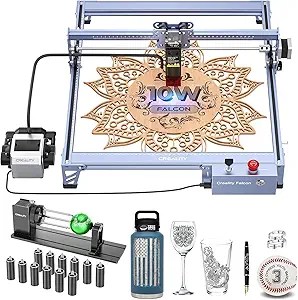
Creality Falcon 10W Laser Engraver with Air Assist and Rotary Roller
The Creality Falcon 10W offers high-precision engraving with its 10,000mW laser, and its easy assembly process makes it accessible for newcomers compared to more complex models like the LONGER Ray5. Its rotary roller expands possibilities for cylindrical objects, and the adjustable air assist enhances cut quality for detailed work. On the downside, its power limits cutting thicker or denser materials, and setup still requires some technical familiarity. Unlike the JL9 20W, it emphasizes safety and ease of use, but sacrifices some cutting depth and material versatility.
Pros:- High-precision engraving with detailed control
- Easy to assemble and operate safely
- Includes rotary roller for cylindrical objects
- Adjustable air assist improves cut quality
Cons:- Limited to certain material thicknesses for cutting
- Relatively high power consumption
- Requires some technical setup for optimal results
Best for: Enthusiasts and small business owners focused on detailed, multi-material projects, especially with cylindrical objects.
Not ideal for: Users needing to cut or engrave very thick materials or those with limited technical experience, as some setup is required.
- Laser Power:10,000mW
- Laser Class:4
- Cutting Thickness:12 mm wood, 3 mm acrylic
- Engraving Speed:up to 10,000mm/min
- Repositioning Accuracy:less than 0.007 inches
- Compatibility:LaserGRBL, LightBurn, Windows, macOS
Bottom line: Ideal for users who prioritize precision and versatility, especially with cylindrical items, over deep material cuts.
JL9 20W Laser Engraver and Cutter with Air Assist, Compatible with Wood, Metal, Acrylic, Glass, Stone
The JL9 20W laser engraver is designed with simplicity and user-friendliness in mind, featuring wireless control via phone and AI design integration—making it more accessible than the LONGER Ray5. Its compact 300x300mm workspace is perfect for small projects, and the included air assist helps achieve cleaner edges. Compared to the larger Algolaser, it offers a more manageable size and setup, but its limited workspace restricts larger workpieces. While it handles various materials well, it may struggle with thick cuts, especially compared to more powerful options.
Pros:- Wireless control via phone simplifies operation
- Compact size saves space and eases setup
- AI design features aid beginners in creating projects
- Includes air assist for cleaner edges
Cons:- Limited work area restricts project size
- Laser power may be insufficient for very thick materials
- Assembly might be challenging for some beginners
Best for: Hobbyists and small business owners new to laser engraving who want straightforward operation and wireless control.
Not ideal for: Professionals or users needing to work on larger projects or cut thick, dense materials regularly.
- Power:20W
- Work Area:11.8 x 11.8 inches (300x300mm)
- Laser Lifespan:10,000+ hours
- Assembly Time:90 seconds
- Upgrade Options:40W diode, 1064nm IR module
Bottom line: Perfect for newcomers seeking an easy-to-use, wireless laser engraver for small-scale projects and quick setups.
LONGER Ray5 20000mW Laser Engraver with Air Assist Kit, 15.7″x15.7″ Working Area, DIY CNC Laser Cutter for Metal, Glass, Wood
The LONGER Ray5 20W offers a significant upgrade in power and workspace, featuring a 20,000mW laser capable of cutting and engraving thick materials like metal and glass. Its large 15.7″x15.7″ area makes it suitable for bigger projects, and the included air assist improves cut quality across diverse materials. While its robust features make it appealing for serious hobbyists and small businesses, its complex setup and moderate user ratings suggest it’s not ideal for beginners or those seeking a plug-and-play experience. Compared to the compact JL9, it emphasizes capacity over ease of use.
Pros:- Powerful 20,000mW laser for thick materials
- Large 15.7″x15.7″ workspace accommodates bigger projects
- Multiple connectivity options including Wi-Fi and app control
- Includes rotary roller kit and air assist for cleaner results
Cons:- Moderate customer ratings reflect potential usability issues
- Complex setup process may challenge newcomers
- High power requires strict safety precautions
Best for: Experienced hobbyists or small-scale manufacturers needing a large working area and high power for versatile, demanding projects.
Not ideal for: Beginners or users with limited technical skills, due to its complex setup and safety considerations with high-power laser operation.
- Laser Power:20000mW
- Working Area:15.7″ x 15.7″
- Laser Spot Size:0.08 x 0.1 mm
- Engraving Accuracy:up to 0.01 mm
- Material Thickness:up to 6mm for cutting
- Connectivity:USB, Wi-Fi, app, TF card
Bottom line: Designed for advanced users who need a spacious, high-power laser capable of handling large and thick materials with precision.
CREALITY FALCON A1 10W Laser Engraver with Enclosed Design and Smart Camera
The CREALITY FALCON A1 is tailored for users valuing safety and quick results, offering a 10W laser with an enclosed design that minimizes risk, unlike open-frame models. The integrated HD camera allows precise setup, and its high-speed engraving of up to 600mm/s makes it stand out against slower devices like the Creality Falcon 10W. While it excels in user safety and ease of use, the limited work area and inability to cut acrylic without coating mean it’s less suited for large or highly reflective projects. Its high speed, combined with safety features, makes it ideal for educational settings or small workshops focused on wood and metal.
Pros:- Enclosed design enhances safety during operation
- High-speed engraving up to 600mm/s for quick results
- Built-in HD camera for precise object positioning
- Supports multiple software including LightBurn and LaserGRBL
Cons:- Limited work area restricts large projects
- Cannot effectively cut acrylic without surface coating
- Limited to 10W power for deep or thick cuts
Best for: Beginners or educational environments needing a safe, fast, and straightforward laser engraver for small projects.
Not ideal for: Professionals requiring large workspaces or cutting thick or reflective materials regularly.
- Power Output:10W
- Laser Class:1
- Working Area:381 × 305mm
- Speed:600mm/s
- Material Compatibility:Wood, Metal (not reflective)
Bottom line: Best suited for newcomers and educational users who prioritize safety, speed, and ease of setup for small-scale projects.
Longer Laser B1 36,000mW Laser Cutter and Engraver with 450x440mm Area, 32-bit Motherboard, Air Assist, Compatible with Windows, Mac, Linux
The Longer Laser B1 stands out for its immense 36,000mW laser power, making it capable of cutting through thick materials like 20mm wood and 15mm acrylic with ease. Its sizable 450x440mm engraving area surpasses many competitors, including the xTool S1, which offers a smaller bed but is more beginner-friendly. The high-speed operation at 30,000mm/min paired with a 32-bit motherboard ensures precision and efficiency, though the high power and size require careful safety handling and dedicated workspace. While setup can be complex for newcomers, its versatility across materials and compatibility with multiple OS and software make it a top choice for professionals and advanced hobbyists. Compared to the smaller, more user-friendly xTool S1, this model trades ease of use for raw capability and scale.Pros:- Exceptional laser power for versatile cutting and engraving
- Large working area supports big projects
- High-speed performance with advanced motherboard
Cons:- Heavy and bulky, requiring dedicated space
- Complex setup and safety considerations for novices
Best for: Experienced makers and small-business owners needing a powerful, large-area laser for diverse materials.
Not ideal for: Beginners seeking a compact, simple-to-operate machine with straightforward setup.
- Laser Power:36,000mW
- Engraving Area:450x440mm
- Max Cutting Thickness:20mm wood, 15mm acrylic
- Material Compatibility:Wood, metal, ceramics, glass, leather
- Speed:30,000mm/min
- Motherboard:32-bit high-speed
Bottom line: This laser engraver is ideal for those who need maximum power and size, accepting setup complexity and safety demands.
Longer RAY5 40W Laser Engraver with Air Assist Kit, Rotary Roller, and Accessories
The Longer RAY5 40W laser engraver offers a robust combination of power and precision, capable of cutting 15mm thick wood and 8mm acrylic with ease, outperforming the xTool S1 in material versatility. Its inclusion of a rotary attachment facilitates cylindrical object engraving, making it suitable for professional projects requiring multi-angle work, unlike the more basic air assist pumps. The laser’s fine detail of 0.002 inches enables intricate designs, which is a step above the detailed but smaller engravings possible on the xTool S1’s large bed. However, its higher price and the need for an additional air pump mean it’s better suited for those with existing setups or serious projects. Compared to the xTool S1, it emphasizes power and versatility over ease of use and beginner features.Pros:- High laser power allows cutting through thick materials
- Multi-color and detailed engraving capabilities
- Includes rotary attachment for cylindrical objects
Cons:- Requires additional air pump for optimal air assist
- Relatively high cost and setup complexity
Best for: Professionals and advanced hobbyists needing high power, multi-material, and cylindrical engraving capabilities.
Not ideal for: Beginners or casual users who prefer plug-and-play simplicity over advanced features.
- Laser Power:40W
- Max Cutting Thickness:0.59 inches wood, 0.31 inches acrylic
- Engraving Precision:0.002 inches
- Focus Area:0.08 * 0.1mm
- Rotary Speed:up to 360°/s
- Control Software Compatibility:Laserbox Basic, LaserGRBL, LightBurn
Bottom line: This engraver suits experienced users seeking power and multi-material versatility, accepting extra setup and investment.
Air Assist Pump for Laser Cutter and Engraver, 30L/min Airflow, Compatible with D1 & D1 Pro
This air assist pump delivers a steady 30L/min airflow, making it a valuable addition to any compatible laser like the xTool S1 or Longer Laser B1 seeking cleaner cuts and reduced smoke. Its straightforward install process and quiet operation enhance workflow without adding noise or vibration, unlike some integrated systems. It’s especially effective at protecting lenses and prolonging equipment lifespan, which is critical for maintaining consistent quality over time. However, its limited compatibility means it won’t work with non-D1 models, and proper setup is necessary to maximize benefits. Compared with the built-in air assist of more advanced machines, this pump offers a simple upgrade that can significantly improve cut quality and safety.Pros:- Provides stable airflow for cleaner, more precise cuts
- Protects lenses and extends equipment lifespan
- Low noise and vibration for a comfortable workspace
Cons:- Requires proper setup for optimal performance
- Limited compatibility to specific laser models
Best for: Owners of D1 or D1 Pro laser engravers looking to improve cut quality and lens protection.
Not ideal for: Users with incompatible laser models or those seeking an all-in-one solution with integrated air assist.
- Airflow:30L/min
- Compatibility:D1, D1 Pro
- Item Weight:3.74 pounds
- Dimensions:6 x 3.5 x 2.6 inches
Bottom line: This pump is a practical upgrade for D1 series owners aiming for improved cut quality and equipment longevity.
xTool S1 Laser Engraver with Air Assist & Honeycomb Bed, 23.93″ x 15.16″ – Beginner-Friendly Desktop Laser Engraving Machine for Wood and Metal
The xTool S1 combines a 10W laser with an ultra-fine spot, enabling detailed photo-realistic engravings on a sizable 23.93″ x 15.16″ bed. Its integrated air assist reduces smoke and scorching during engraving, much like the dedicated pumps but with a simplified setup aimed at newcomers. Features like auto-focus and AI-powered software make complex projects accessible, contrasting with the more industrial design of the Longer Laser B1. While the large bed is attractive for bigger projects, its relatively high cost and setup learning curve may deter casual users. Compared to the more powerful Longer RAY5, the S1 emphasizes user-friendliness and safety over raw power, making it ideal for hobbyists and small business owners starting out.Pros:- High precision with ultra-fine laser spot
- Large bed size supports big projects
- Automatic focus and user-friendly software
Cons:- Higher cost for entry-level machine
- Requires setup and some learning curve
Best for: Beginners and hobbyists seeking a large, safe, and easy-to-use laser engraver for detailed work.
Not ideal for: Experienced users needing high power or large-scale industrial capability.
- Laser Power:10W (10000mW)
- Bed Size:23.93 x 15.16 inches
- Material Compatibility:Wood, leather, craft paper, stone, glass
- Technology:Pin-point Positioning, AutoPassthrough, Auto-focus
- Safety Features:Enclosed design, protective cover, flame sensors
- Frame Material:Aerospace-grade aluminum
Bottom line: This laser engraver offers a compelling balance of safety, size, and ease for newcomers, though at a higher price point.