Starting a small business with a Cricut machine means balancing versatility, reliability, and cost. The Cricut Maker 4 stands out as the best overall choice for its advanced cutting capabilities and expansive tool compatibility. For those focused on budget, the Cricut Joy offers a compact, easy-to-use option that’s perfect for small-scale production. However, tradeoffs include size limitations or higher costs for premium features. Continue reading for a detailed comparison to help you find the best fit for your craft business needs.

Get business pricing on tools and workshop supplies
- Business-only prices and quantity discounts
- Tax-exempt purchasing
- Multiple users, one account, clear invoices
Complete the kit


Key Takeaways
- The Cricut Maker 4 offers the most versatility and durability, making it ideal for growing businesses with diverse project needs.
- Compact models like the Cricut Joy excel for small batches and limited workspace, but may lack some advanced features.
- Bundles that include digital content or extra tools provide better value for beginners, while standalone machines suit more experienced users.
- Higher-priced options tend to offer more cutting options, faster speeds, and expanded accessory compatibility, justifying their cost for serious entrepreneurs.
- Size and connectivity options vary; Bluetooth-enabled models streamline workflow, but some compact units may require wired connections.
| Cricut Joy Smart Cutting Machine Writable Vinyl Starter Kit |  | Best Portable for Small-Scale, On-the-Go Crafting | Brand: Cricut | Model: 8002284 | Included Components: Cricut Joy smart cutting machine, Card Machine Mat, 1 roll of Smart Label Writable Vinyl, Fine Point Pen Set, 3-piece tool kit, 30 digital images | VIEW ON AMAZON | See Our Full Breakdown |
| Cricut Explore 5 Essential Bundle + Multicolor Sampler |  | Best Versatile and Wireless for Growing Small Businesses | Model: Explore 5 | Materials Supported: Vinyl, HTV, cardstock, printable vinyl, paper, felt, specialty materials | Cutting Length: up to 12 feet with Smart Materials | VIEW ON AMAZON | See Our Full Breakdown |
| Cricut Joy Xtra Cutting Machine T-Shirt Making Bundle with Mini EasyPress Heat Press | 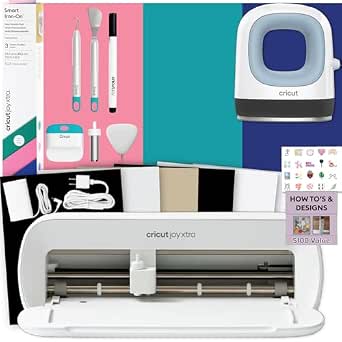 | Best for Small-Scale Apparel and Personal Gifts | Brand: Cricut | Model: zJXtra2 | Included Components: Cricut Joy Xtra machine, Mini EasyPress, Smart Iron-On materials, tools, design guides | VIEW ON AMAZON | See Our Full Breakdown |
| Cricut Maker 4 – Smart Cutting Machine (Seashell) with Engagement Plus Bundle |  | Best for Versatility and Advanced Crafting | Model: Cricut Maker 4 | Color: Seashell | Included Items: Fine-Point Blade, Light Grip Machine Mat, 2 Fine Point Pens, Tools, Materials, Cricut EasyPress 2, Pressing Mat, Tote Bag, Smart Iron-On, Smart Vinyl, Cardstock, Transfer Tape, Digital Images | VIEW ON AMAZON | See Our Full Breakdown |
| Cricut Maker 4 Smart Cutting Machine – Seashell |  | Best for Speed and Wide Material Compatibility | Cutting Speed: Up to 2X faster than previous model | Material Compatibility: Metal, leather, paper, and more | Maximum Cut Length: 12 ft (3.6 m) | VIEW ON AMAZON | See Our Full Breakdown |
| Cricut Joy Xtra Smart Cutting Machine |  | Best Versatility for Small Business Customization | Material Compatibility: 50+ materials including vinyl, iron-on HTV, cardstock, stickers | Functions: Cutting, drawing, foiling, print-then-cut | Design Software: Design Space with 3,000+ images and 100+ fonts | VIEW ON AMAZON | See Our Full Breakdown |
| Cricut Joy Machine – Compact Portable DIY Smart Cutting Machine for Labels, Cards & Crafts, Bluetooth-Enabled, Blue |  | Best for On-the-Go Small-Scale Projects | Material Compatibility: Vinyl, Iron-on, Paper, Cardstock, and more | Connectivity: Bluetooth | Included Components: Joy machine | VIEW ON AMAZON | See Our Full Breakdown |
| Cricut Explore 5 Essential Bundle + Rainbow Sampler |  | Best for Beginners and Small Business Setup | Material Compatibility: Over 100 materials including vinyl, HTV, cardstock, printable vinyl, felt | Connectivity: Bluetooth | Machine Size: 30% more compact than previous models | VIEW ON AMAZON | See Our Full Breakdown |
| Cricut Explore 5 Essential Bundle + Digital Content, Taupe | 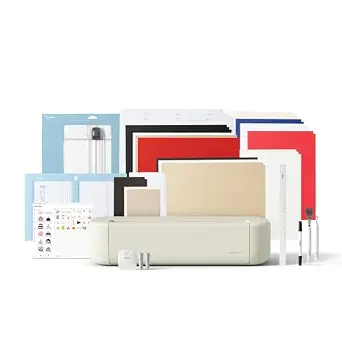 | Best for Tech-Savvy Beginners and Small Business Growers | Size: 12 inches (30.5 cm) | Material Compatibility: Vinyl, iron-on, cardstock, printable materials | Included Projects: Up to 65 | VIEW ON AMAZON | See Our Full Breakdown |
| Cricut Maker 4 Cutting Machine Ultimate Beginner Sticker Making Bundle |  | Best for Sticker and Decal Small Business Production | Model: Cricut Maker 4 | Color: Seashell | Functionality: Print then Cut | VIEW ON AMAZON | See Our Full Breakdown |
| Cricut Joy Machine & Digital Content Library Bundle |  | Best Compact for On-the-Go Small-Scale Projects | Weight: 3.9 lbs | Material Compatibility: 50+ materials including cardstock, vinyl, iron-on | Connectivity: Wireless Bluetooth | VIEW ON AMAZON | See Our Full Breakdown |
| Cricut Maker 4 Starter Kit for Beginners – Smart Cutting Machine with Vinyl & Iron-On (HTV), Tools & Materials for Stickers, Shirts & DIY Crafts |  | Best for Beginners Seeking Versatility and All-in-One Start | Model: Maker 4 | Included Items: Die-cutting machine, cutting mat, blade, tools, vinyl, iron-on sampler sheet, project inspiration | Suitable For: Stickers, shirts, DIY crafts | VIEW ON AMAZON | See Our Full Breakdown |
| Cricut Joy 2 Essential Bundle + Digital Content, Blue |  | Best Compact for Versatile Everyday Crafting | Cutting Width: 4.5 inches | Weight: just over 2 lbs | Materials Compatibility: 75+ including vinyl, iron-on, printable materials, and cardstock | VIEW ON AMAZON | See Our Full Breakdown |
| Cricut Joy 2 + Deluxe Bundle, Coral |  | Best for All-in-One Quick Projects with Full-Color Printing | Cutting Width: 4.5 inches | Weight: just over 2 lbs | Compatibility: 75+ materials including printable vinyl | VIEW ON AMAZON | See Our Full Breakdown |
| Cricut Maker 3 & Digital Content Library Bundle – Smart Cutting Machine, Blue | 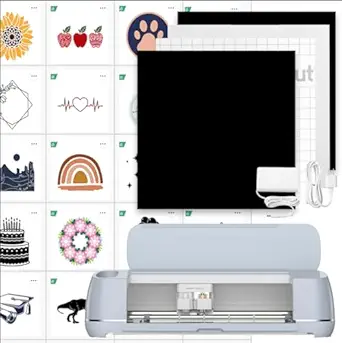 | Best for Advanced Small Businesses Needing Heavy-Duty Cutting | Color: Blue | Cutting Force: 10X | Speed: 2X faster | VIEW ON AMAZON | See Our Full Breakdown |
| cricut machine for small business | Material Compatibility |
|---|---|
| Cricut Joy Smart Cutting Machi | Cardstock, vinyl decal, iron-on, Smart Material |
| Cricut Explore 5 Essential Bun | — |
| Cricut Joy Xtra Cutting Machin | — |
| Cricut Maker 4 | Leather, wood, vinyl, iron-on HTV, cardstock, stickers, and more |
| Cricut Maker 4 Smart Cutting M | Metal, leather, paper, and more |
| Cricut Joy Xtra Smart Cutting | 50+ materials including vinyl, iron-on HTV, cardstock, stickers |
| Cricut Joy Machine | Vinyl, Iron-on, Paper, Cardstock, and more |
| Cricut Explore 5 Essential Bun | Over 100 materials including vinyl, HTV, cardstock, printable vinyl, felt |
| Cricut Explore 5 Essential Bun | Vinyl, iron-on, cardstock, printable materials |
| Cricut Maker 4 Cutting Machine | — |
| Cricut Joy Machine & Digital C | 50+ materials including cardstock, vinyl, iron-on |
| Cricut Maker 4 Starter Kit for | — |
| Cricut Joy 2 Essential Bundle | — |
| Cricut Joy 2 + Deluxe Bundle | — |
| Cricut Maker 3 & Digital Conte | — |
More Details on Our Top Picks
Cricut Joy Smart Cutting Machine Writable Vinyl Starter Kit
The Cricut Joy Smart Cutting Machine Starter Kit stands out for its compact, lightweight design, making it ideal for crafters who need mobility and quick setup. Compared to the Cricut Explore 5, it supports fewer materials and doesn’t have advanced features like longer matless cutting, but its portability and ease of use make it perfect for small businesses focused on labeling, small projects, or on-site customizations. Its included writable vinyl and digital library enhance versatility, though the limited dimensions and lack of detailed specs can restrict larger or more complex projects. This machine is best suited for entrepreneurs who prioritize convenience and quick turnaround over extensive material compatibility or advanced features.
Pros:- Compact and portable design for crafting anywhere
- Supports over 50 materials with high precision
- Includes writable vinyl for labeling and customization
- Digital library of 30 images for versatile projects
Cons:- Limited information on dimensions and weight, which affects portability assessment
- Requires registration for digital content access
- No specific color options or customization features
Best for: Small business owners needing portable, quick-turnaround projects such as labels, small decals, or personalized organization items
Not ideal for: Businesses looking for high-volume production or working with a wide range of materials requiring advanced cutting features
- Brand:Cricut
- Model:8002284
- Included Components:Cricut Joy smart cutting machine, Card Machine Mat, 1 roll of Smart Label Writable Vinyl, Fine Point Pen Set, 3-piece tool kit, 30 digital images
- Material Compatibility:Cardstock, vinyl decal, iron-on, Smart Material
- Color:Not specified
- Dimensions:Not specified
- Weight:Not specified
Our verdict“This pick makes the most sense for small business owners who need a portable, straightforward machine for labeling and small projects on the go.”
Cricut Explore 5 Essential Bundle + Multicolor Sampler
The Cricut Explore 5 Essential Bundle offers a significant upgrade over smaller, portable models like the Cricut Joy, supporting over 100 materials and featuring wireless Bluetooth connectivity. This makes it better suited for small businesses that want to produce a variety of custom decals, shirts, and cards without being tethered to a computer. Its ability to handle matless cutting for longer projects increases productivity, but the setup can be complex for absolute beginners, especially compared to the more straightforward Cricut Joy. While it lacks some of the speed and advanced features of the Cricut Maker 4, it balances versatility and ease of use for entrepreneurs ready to expand their product offerings.
Pros:- Supports over 100 materials, including specialty ones
- Wireless Bluetooth for flexible design workflows
- Supports matless cutting for longer, uninterrupted projects
- Includes a comprehensive set of materials and tools
Cons:- Requires a computer or mobile device for design and operation
- Initial setup may be complex for new users
- Limited to certain materials supported by the machine
Best for: Small business owners requiring a versatile, wireless machine capable of supporting a broad range of materials for diverse products
Not ideal for: Crafters seeking a simple, plug-and-play device or those with limited technical skills
- Model:Explore 5
- Materials Supported:Vinyl, HTV, cardstock, printable vinyl, paper, felt, specialty materials
- Cutting Length:up to 12 feet with Smart Materials
- Connectivity:Bluetooth
- Included Materials:Smart Vinyl, Smart Iron-On, Value Cardstock, Insert Card Sets, Printable Vinyl, Cricut Pens, Card Set
- Dimensions:30% more compact than previous models
Our verdict“This machine is ideal for small businesses that want a versatile, wireless cutter capable of handling diverse projects with ease.”
Cricut Joy Xtra Cutting Machine T-Shirt Making Bundle with Mini EasyPress Heat Press
The Cricut Joy Xtra T-Shirt Making Bundle combines the compact Cricut Joy Xtra with a Mini EasyPress, making it an excellent choice for small-scale apparel businesses or hobbyists focusing on personalized gifts. Unlike larger machines like the Cricut Maker 4, this bundle emphasizes ease of use and quick setup for heat transfer projects, especially on small surfaces like shirts and tote bags. Its user-friendly workflow and included tools support beginners entering the custom apparel market, but it isn’t suited for high-volume production or larger projects. The Mini EasyPress provides precise heat application, though the small size limits its use to detailed or small items only.
Pros:- Complete bundle with tools and materials for apparel projects
- Easy-to-use heat transfer workflow suitable for beginners
- Mini EasyPress provides precise, controlled heat for detailed designs
- Ideal for small-scale, personalized projects
Cons:- Limited to small projects; not suitable for large or bulk production
- Requires some crafting skills for best results
- Price and availability can vary depending on retailer
Best for: Small business owners or hobbyists creating personalized apparel, tote bags, or small gifts with a focus on ease and speed
Not ideal for: Businesses requiring large-scale production or working on large or complex projects
- Brand:Cricut
- Model:zJXtra2
- Included Components:Cricut Joy Xtra machine, Mini EasyPress, Smart Iron-On materials, tools, design guides
- Warranty:1 Year
- UPC:810109113354
- ASIN:B0CG6TL3NK
- Best Sellers Rank:#35,443 in Arts, Crafts & Sewing, #28 in Scrapbooking Die-Cut Machines
Our verdict“This bundle is perfect for small-scale apparel businesses or hobbyists focused on custom, personalized items with quick turnaround times.”
Cricut Maker 4 – Smart Cutting Machine (Seashell) with Engagement Plus Bundle
The Cricut Maker 4 stands out as the most versatile model in this lineup, capable of working with over 300 materials ranging from leather to wood to vinyl. Its ability to cut, draw, foil, score, engrave, and more makes it ideal for small businesses that want to diversify their product range without investing in multiple machines. Compared to the Cricut Maker 4 Seashell standalone, the bundle adds value with tools, accessories, and a heat press, supporting a wider variety of projects. However, its complex setup and premium price tag make it more suitable for experienced entrepreneurs or those committed to expanding their crafting capabilities.
Pros:- Supports over 300 materials, including leather, wood, and metal
- Includes comprehensive bundle with tools, accessories, and heat press
- Fast, precise cuts with multiple functions like engraving and foiling
- No design experience needed—user-friendly app compatibility
Cons:- Complex setup process for new users
- Premium price point may be prohibitive for casual crafters
- Requires more space due to its size and accessory setup
Best for: Small businesses seeking a high-end, multi-functional machine for a broad range of creative projects and product offerings
Not ideal for: Beginners or those with limited space and budget, as the machine’s complexity and cost may be overwhelming
- Model:Cricut Maker 4
- Color:Seashell
- Included Items:Fine-Point Blade, Light Grip Machine Mat, 2 Fine Point Pens, Tools, Materials, Cricut EasyPress 2, Pressing Mat, Tote Bag, Smart Iron-On, Smart Vinyl, Cardstock, Transfer Tape, Digital Images
- Material Compatibility:Leather, wood, vinyl, iron-on HTV, cardstock, stickers, and more
- Features:Cuts, draws, foils, scores, engraves, debosses, perforates
- Print-Then-Cut:Yes
- Speed:Up to 2X faster than previous model
Our verdict“This machine is best suited for small businesses ready to invest in a versatile, high-capability cutter for diverse, professional-quality projects.”
Cricut Maker 4 Smart Cutting Machine – Seashell
The Cricut Maker 4 Seashell is designed for those who prioritize fast turnaround and broad material support. Its ability to cut, engrave, and deboss at up to 2X the speed of previous models makes it well-suited for small business owners needing efficient production. Compatible with a wide range of materials, including metal, leather, and paper, it offers long continuous cuts of up to 12 feet, which is beneficial for larger or repeated designs. Compared to the Cricut Joy, it provides much more power and flexibility but demands some prior experience or willingness to learn complex features. This model is ideal for entrepreneurs who want speed and versatility without sacrificing quality.
Pros:- Fast cutting speeds for increased productivity
- Supports a wide range of materials, including metals and leather
- Long cuts up to 12 feet for larger projects
- Compatible with Cricut Design Space for easy project creation
Cons:- Requires use of proprietary materials for optimal results
- Complex setup might challenge new users
- Higher price point compared to basic cutters
Best for: Small businesses that require fast, high-quality cuts across a wide array of materials for various product types
Not ideal for: Beginners or hobbyists who prefer simple, straightforward machines with minimal setup
- Cutting Speed:Up to 2X faster than previous model
- Material Compatibility:Metal, leather, paper, and more
- Maximum Cut Length:12 ft (3.6 m)
- Connectivity:Compatible with Cricut Design Space app
Our verdict“This model is perfect for small businesses that need fast, versatile cutting without sacrificing precision or material variety.”
Cricut Joy Xtra Smart Cutting Machine
The Cricut Joy Xtra stands out for its ability to handle over 50 materials, including heavier substrates like cardstock and stickers, while supporting full-color print-then-cut designs. Unlike the Cricut Joy Machine, which is more limited in its material range and primarily suited for simple labels and cards, the Xtra offers greater flexibility through its foiling and drawing functions—perfect for businesses wanting a broader product catalog. The tradeoff is that it requires an optional subscription for full access to Design Space’s library, and its size constraints mean you may need additional accessories for larger projects. This makes it ideal for small businesses that prioritize variety and personalization without needing industrial-scale volume.
Pros:- Handles over 50 materials including heavier substrates
- Supports full-color print-then-cut designs
- Includes foiling and drawing capabilities
- User-friendly Design Space software with extensive content library
Cons:- Requires optional subscription to access full library
- Limited to certain material sizes without extra accessories
Best for: Small business owners who need a versatile, all-in-one machine capable of handling diverse materials and complex designs.
Not ideal for: Businesses focused solely on mass production of simple items, as the Xtra’s features may be more than needed and its size less optimized for high-volume workflows.
- Material Compatibility:50+ materials including vinyl, iron-on HTV, cardstock, stickers
- Functions:Cutting, drawing, foiling, print-then-cut
- Design Software:Design Space with 3,000+ images and 100+ fonts
- Material Sizes:US Letter, A4
Our verdict“This pick makes the most sense for small businesses seeking a versatile machine with creative flexibility.”
Cricut Joy Machine – Compact Portable DIY Smart Cutting Machine for Labels, Cards & Crafts, Bluetooth-Enabled, Blue
The Cricut Joy offers unmatched portability in a compact design, making it ideal for quick, small projects like labels and personalized cards. Compared to the Cricut Explore 5, which supports a broader range of materials and larger projects, the Joy is limited by its size but excels in ease of use and mobility. Its Bluetooth connectivity simplifies design transfer, and its compatibility with over 50 materials makes it versatile for everyday craft needs. However, this portability means it’s less suited for larger batch production or complex designs that demand more space or power. For entrepreneurs needing a lightweight, ready-to-go machine for small runs, the Joy is a smart choice.
Pros:- Compact and portable design
- Works with over 50 materials including vinyl and iron-on
- Bluetooth connectivity for wireless operation
- Easy to use with free Design Space app
Cons:- Requires compatible device with Bluetooth and internet
- Tools and accessories are sold separately
- Limited to small projects due to size
Best for: Small business owners who prioritize mobility and quick turnaround for small-scale, personalized products.
Not ideal for: Businesses requiring high-volume production or larger-format projects, as the compact size limits capacity and material handling.
- Material Compatibility:Vinyl, Iron-on, Paper, Cardstock, and more
- Connectivity:Bluetooth
- Included Components:Joy machine
- Item Type:Cricut Joy Machine – DIY, Label Maker, Paper Cutter
Our verdict“Perfect for entrepreneurs who need portability and simplicity for quick, small projects.”
Cricut Explore 5 Essential Bundle + Rainbow Sampler
The Cricut Explore 5 Essential Bundle offers a well-rounded package for new entrepreneurs, supporting over 100 materials with precise cuts and Bluetooth connectivity. Its smaller, more compact size—about 30% less than previous models—fits easily into small business spaces. Compared to the Cricut Maker 4, which is more robust and suited for heavier-duty projects, the Explore 5 strikes a balance between versatility and ease of use, making it attractive for those just starting out or with limited space. The included bundle of materials and tutorials helps new users get up and running quickly, but some may find the setup process slightly complex if unfamiliar with design software. This is an excellent entry point for small-scale, personalized product lines.
Pros:- Supports over 100 materials with high precision
- Compact size saves space
- Includes a comprehensive starter bundle
- Bluetooth connectivity for easy setup
Cons:- Limited to basic crafting features
- Requires access to Design Space app
- Initial setup may be complex for some
Best for: Beginners or small business owners new to crafting who want a reliable, space-saving machine with broad material support.
Not ideal for: High-volume manufacturers or users needing advanced features, as the Explore 5 is geared more toward versatility than heavy-duty production.
- Material Compatibility:Over 100 materials including vinyl, HTV, cardstock, printable vinyl, felt
- Connectivity:Bluetooth
- Machine Size:30% more compact than previous models
- Cutting Length:Up to 12 feet with Smart Materials
- Included Materials:Smart Vinyl, Smart Iron-On, Cardstock, Printable Vinyl
- Project Library:400+ projects and tutorials
Our verdict“Ideal for small businesses starting with a versatile machine that’s easy to learn and space-efficient.”
Cricut Explore 5 Essential Bundle + Digital Content, Taupe
The Cricut Explore 5 Taupe combines style with function, supporting over 100 materials and featuring Bluetooth for seamless design transfer. Its sleek, modern look makes it appealing for entrepreneurs who want a stylish workspace. Compared with the Cricut Maker 4, which offers more power and accessory options, the Explore 5 focuses on versatility within a compact form. The included digital content library with thousands of images, fonts, and projects accelerates creative output, making it suitable for those eager to jump into personalized product creation. The main tradeoff is that some tools and accessories are sold separately, so initial costs can add up. Still, this machine is well-suited to small businesses that value aesthetics and broad material compatibility.
Pros:- Stylish modern design
- Supports over 100 materials
- Includes large digital content library
- Bluetooth connectivity for easy wireless operation
Cons:- Tools and some accessories sold separately
- Requires Bluetooth-enabled device and internet
- Limited to users aged 13+
Best for: Design-oriented small business owners who want a stylish, versatile machine with extensive digital content support.
Not ideal for: Mass production or heavy-duty crafting, as the Explore 5 is optimized for flexibility and small-scale projects rather than high-volume output.
- Size:12 inches (30.5 cm)
- Material Compatibility:Vinyl, iron-on, cardstock, printable materials
- Included Projects:Up to 65
- Content Library:3,000+ images, 100+ fonts, 1,000+ projects
Our verdict“This machine fits small businesses seeking a stylish, versatile device with a vast digital resource library.”
Cricut Maker 4 Cutting Machine Ultimate Beginner Sticker Making Bundle
The Cricut Maker 4 Bundle is tailored for small businesses focusing on sticker and decal creation, emphasizing print-then-cut functionality. It includes essential materials like printable sticker paper and adhesive vinyl, making it ready for immediate production. Compared to the Explore 5, which is more general-purpose, the Maker 4 excels in sticker durability and water resistance, critical for products that need to withstand the elements. The tradeoff is a steeper learning curve for beginners unfamiliar with design software, and its focus on stickers limits its suitability for other product types. For small businesses that prioritize custom, durable decals, this bundle offers a comprehensive, ready-to-go solution.
Pros:- Includes complete bundle of materials and tools
- Produces durable, water-resistant stickers
- Print-then-cut functionality for complex designs
- Ideal for small business sticker production
Cons:- Requires compatible printer and Design Space
- Learning curve for beginners
- Limited project scope beyond stickers and decals
Best for: Small business owners specializing in custom stickers, labels, or decals requiring durable, water-resistant finishes.
Not ideal for: Those seeking a multi-purpose machine for a wide variety of crafts, as the Maker 4 is more specialized in sticker and decal projects.
- Model:Cricut Maker 4
- Color:Seashell
- Functionality:Print then Cut
- Included Materials:Printable sticker paper, adhesive vinyl
- Intended Use:Custom stickers, labels, decals
Our verdict“Perfect for small businesses needing a dedicated, durable sticker manufacturing machine with all essentials included.”
Cricut Joy Machine & Digital Content Library Bundle
This bundle stands out for its portability and ease of use, making it ideal for small businesses that need to craft personalized items quickly. Compared with the Cricut Joy 2 Essential Bundle, it includes a larger digital library and more project options, but its size limits the scale of projects you can undertake. The Bluetooth connectivity and cloud-based design app simplify setup and operation, perfect for mobile entrepreneurs or those with limited workspace. However, its small size means it’s less suitable for larger or more complex items, and additional tools or materials might be needed for more advanced outcomes. This makes it a strong choice for micro-businesses focusing on personalized crafts, home decor, or small batch projects.
Pros:- Lightweight and portable design for crafting anywhere
- Compatible with over 50 materials including Smart Materials
- Wireless Bluetooth connectivity and cloud-based app for seamless operation
- Includes extensive digital content and project ideas
Cons:- Limited to small-scale projects because of its size
- Requires a smartphone or computer for full functionality
- Additional accessories or materials may be needed for advanced projects
Best for: Small business owners who prioritize portability and quick turnaround for small-scale, personalized projects
Not ideal for: Businesses needing to produce large or complex items regularly, due to size constraints
- Weight:3.9 lbs
- Material Compatibility:50+ materials including cardstock, vinyl, iron-on
- Connectivity:Wireless Bluetooth
- Included Content:30 images, blade and housing, fine point black pen, StandardGrip mat, welcome card, power adapter, 50 projects, free trial Cricut Access
Our verdict“A perfect fit for small-scale, mobile businesses that need reliable, compact crafting tools for personalized items.”
Cricut Maker 4 Starter Kit for Beginners – Smart Cutting Machine with Vinyl & Iron-On (HTV), Tools & Materials for Stickers, Shirts & DIY Crafts
This starter kit makes the most sense for newcomers who want a versatile, all-in-one solution, especially those interested in creating stickers, apparel, and DIY gifts. Compared with the Cricut Maker 3 & Digital Content Library Bundle, the Maker 4 provides a broader range of compatible materials and more precise cuts, but it also involves a steeper learning curve and higher price point. The included tools and materials give immediate crafting options, yet some users may find they need additional supplies for more complex or larger projects. It’s a solid choice for entrepreneurs starting small but planning to expand to diverse product lines, thanks to its compatibility with a wide array of materials and user-friendly guides.
Pros:- All-in-one kit with tools and materials for immediate use
- Versatile for various crafts including stickers and apparel
- Includes instructional guides to ease learning curve
- Compatible with Cricut Design Space and a wide range of materials
Cons:- May require additional materials for more advanced projects
- Learning curve for new users unfamiliar with digital design
- Limited to Cricut-compatible materials
Best for: Beginners or small business owners wanting a versatile machine with a complete starter kit for multiple craft types
Not ideal for: Seasoned crafters or businesses needing high-volume production, due to its beginner focus and limited capacity for large projects
- Model:Maker 4
- Included Items:Die-cutting machine, cutting mat, blade, tools, vinyl, iron-on sampler sheet, project inspiration
- Suitable For:Stickers, shirts, DIY crafts
- Compatibility:Cricut Design Space
Our verdict“Ideal for small business startups that want a beginner-friendly, versatile machine with all essential supplies included.”
Cricut Joy 2 Essential Bundle + Digital Content, Blue
The Cricut Joy 2 Essential Bundle is tailored for small businesses that need a compact, all-in-one crafting solution for quick projects like labels, decals, or cards. In comparison to the Cricut Joy 2 + Deluxe Bundle, this version offers a streamlined set of essentials suitable for ongoing small projects, with the plus of digital content that boosts creative options. Its small size (just over 2 lbs) makes it easy to store and transport, perfect for craft businesses operating at markets or pop-up shops. However, its limited cutting width of 4.5 inches restricts larger projects, and additional tools are sold separately. This makes it well-suited for entrepreneurs focused on small, daily craft items rather than large batch production.
Pros:- Compact and lightweight for easy storage and transport
- Compatible with over 75 materials, including printable options
- Includes a large digital library for diverse projects
- Supports full-color printing with home inkjet printers
Cons:- Limited to small projects because of 4.5-inch cutting width
- Requires Bluetooth-enabled device and internet connection
- Additional tools and accessories are sold separately
Best for: Small business owners who need a portable machine for everyday small projects on a budget
Not ideal for: Businesses requiring larger cuts or manufacturing larger batches of items, due to size and cutting width limitations
- Cutting Width:4.5 inches
- Weight:just over 2 lbs
- Materials Compatibility:75+ including vinyl, iron-on, printable materials, and cardstock
- Included Content:3,000+ images, 100+ fonts, 1,000+ projects
Our verdict“Best suited for small businesses focusing on quick, everyday projects that benefit from portability and versatility.”
Cricut Joy 2 + Deluxe Bundle, Coral
This version of the Cricut Joy 2 excels for users who want a ready-to-use package with a variety of tools and materials, making it suitable for busy small businesses producing labels, decals, or personalized gifts. Compared to the Essential Bundle, the Deluxe Bundle includes additional tools and materials, allowing for up to 55 projects straight out of the box. Its compact design and Bluetooth connectivity make it easy to operate from a smartphone or tablet, but its 4.5-inch cutting width limits larger or more complex projects. The inclusion of printable vinyl and full-color support is a significant advantage for creative businesses aiming for vibrant, eye-catching products.
Pros:- Includes a comprehensive set of tools and materials for immediate use
- Supports full-color printing with printable vinyl and inkjet printers
- Compact and portable for mobile or small-space businesses
- Ready for a variety of quick projects like decals and labels
Cons:- Limited to small projects with 4.5-inch cut width
- Additional tools or accessories are sold separately
- Requires Bluetooth and app connectivity, which may be a barrier for some users
Best for: Small business owners needing a portable, all-in-one machine that supports colorful, quick-turnaround projects
Not ideal for: Businesses that require larger projects or high-volume batch production, due to the limited cutting width and accessory scope
- Cutting Width:4.5 inches
- Weight:just over 2 lbs
- Compatibility:75+ materials including printable vinyl
- Included Content:Smart Vinyl, Smart Iron-On, Value Cardstock, Insert Card Sets, Printable Vinyl
Our verdict“A versatile, portable solution perfect for small businesses focusing on colorful, small-scale projects with quick turnaround times.”
Cricut Maker 3 & Digital Content Library Bundle – Smart Cutting Machine, Blue
This bundle is designed for small businesses ready to scale up, offering a machine capable of cutting over 300 materials and supporting 13 tools, including rotary and knife blades. Its ability to cut up to 12 feet long with Smart Materials and fast speeds makes it suitable for larger batches or complex projects. Compared to the Cricut Maker 4, the Maker 3 emphasizes speed and material versatility, but it requires additional tool purchases for full functionality. Its extensive design library and tutorials support growth and skill development, making it ideal for entrepreneurs expanding their product lines beyond basic crafts. However, its higher cost and learning curve might deter absolute beginners or hobbyists just starting out.
Pros:- Cuts over 300 materials including thick and tough options
- Supports 13 tools for versatile crafting
- Fast, precise cuts up to 12 feet long using Smart Materials
- Includes extensive design library and tutorials for growth
Cons:- Requires purchasing additional tools separately
- Steeper learning curve for new users unfamiliar with advanced features
- Higher initial investment compared to simpler models
Best for: Small business owners who want a high-capacity, quick-cutting machine capable of handling diverse and larger-scale projects
Not ideal for: Beginners or hobbyists with limited budgets, since it involves additional tool purchases and a steeper learning curve
- Color:Blue
- Cutting Force:10X
- Speed:2X faster
- Materials:300+
- Cut Length:up to 12 ft
- Connectivity:Wireless Bluetooth
- Tools Compatibility:13 tools
- Included Content:30 images, 50 free project templates, access to Cricut Design Space
Our verdict“Ideal for small businesses seeking a professional-grade, high-speed cutter capable of handling complex and larger projects efficiently.”

How We Picked
The products in this roundup were evaluated based on performance, build quality, ease of use, versatility, and overall value. We prioritized machines that can handle a variety of materials and project types relevant to small business needs, such as custom apparel, labels, and small batch crafts. Cost-effectiveness was also a key factor, especially for entrepreneurs just starting out. Our rankings reflect a balance between feature sets and affordability, aiming to guide small business owners to options that grow with their operations.Factors to Consider When Choosing Cricut Machine For Small Business
Choosing the right Cricut for your small business involves more than just features; it’s about aligning the machine’s capabilities with your specific projects and budget. Consider the types of products you plan to create, as this influences the need for certain tools or cutting sizes. Reliability and ease of use are critical—especially if you intend to run the machine frequently or with multiple team members. Additionally, accessory compatibility and software features can significantly impact your workflow. Be mindful of the initial investment versus long-term value, especially if you plan to scale your business.
Performance & Material Compatibility
Look for a Cricut machine that can cut a wide range of materials, from vinyl and paper to thicker options like leather or fabric. For small business use, the ability to handle different projects without frequent upgrades is vital. Machines like the Cricut Maker 4 excel here, offering adaptive tools and high precision. Lower-tier models may struggle with thicker materials or require additional accessories, which can add to your costs and complexity. Your choice should match your product lineup to avoid bottlenecks in production.
Ease of Use & Workflow
For small businesses, especially those with a team, intuitive interfaces and reliable connectivity are essential. Bluetooth-enabled models facilitate a smoother workflow, reducing setup time and allowing for mobile operation. Some machines include touchscreen controls or integrated design software, which can speed up project turnaround. Conversely, machines with complicated interfaces or frequent jams can slow progress and frustrate users, impacting your business’s efficiency. Consider your comfort level and the learning curve when choosing.
Size & Workspace Considerations
Compact models like the Cricut Joy are excellent for limited spaces and quick projects, but they may limit your project size or material choice. Larger machines, such as the Cricut Maker 4, require dedicated workspace but offer greater flexibility for bigger designs. Think about your available area and whether you need portability—if you plan to attend craft fairs or set up in different locations, a smaller, portable model might be preferable. Balance your workspace constraints with your business ambitions.
Accessories & Software Ecosystem
Compatibility with a range of accessories and design software can expand your creative options. Some machines come bundled with digital content, templates, or additional tools, enhancing value. The ability to connect with proprietary apps or third-party design programs impacts your workflow and project diversity. Remember that investing in compatible tools and materials can significantly boost your output quality and efficiency, especially as your business scales.
Budget & Long-Term Value
While budget constraints are real, selecting a machine solely based on price can lead to limitations or additional costs later. Consider the initial investment against potential returns—more capable machines may cost more upfront but save time and expand product offerings. Also, evaluate the availability and price of consumables and accessories, which can impact ongoing expenses. Small business owners should aim for a machine that offers room to grow without necessitating frequent replacements or upgrades.
Frequently Asked Questions
Can a Cricut machine handle production for a small business?
Yes, certain Cricut models like the Cricut Maker 4 are designed for more extensive use, offering faster speeds, higher durability, and the ability to cut thicker materials. However, they still require some workflow management to maximize efficiency, such as batch processing and proper maintenance. For consistent, larger-scale production, investing in a model with higher capacity and more accessories makes sense. Keep in mind that even the most capable Cricut machines have limitations compared to industrial cutters, so planning your project scope is key.
Is a more expensive Cricut machine worth the extra cost?
Higher-priced models generally provide advanced features like faster cutting speeds, larger working areas, and broader material compatibility, which can justify their cost for serious small business owners. If your volume or project complexity increases, these features save time and expand your product range. However, for beginners or occasional use, a more affordable option like the Cricut Joy can be sufficient. Assess your current needs and expected growth to decide whether the investment aligns with your business goals.
What should I consider when choosing between a portable and a larger Cricut machine?
Portability is ideal if you frequently attend craft fairs or have limited workspace, but it often comes with size restrictions and fewer cutting features. Larger machines like the Cricut Maker 4 provide greater versatility and larger cutting mats, which are better suited for bigger projects or higher-volume production. Think about your typical project sizes, workspace size, and whether mobility is a priority. A portable model can be a good supplementary tool, but for full-scale production, a larger, more capable machine usually makes more sense.
How important is design software compatibility for my small business?
Design software compatibility directly influences your creative flexibility and workflow efficiency. Cricut’s proprietary Design Space is common across devices, but some machines support third-party software or offer advanced features that can save time or improve quality. If you plan to create complex designs or work with custom graphics, choosing a machine with robust software support is beneficial. This can also reduce the learning curve, especially if you’re expanding your product offerings or collaborating with others.
Should I prioritize accessories or the base machine when buying?
While a solid base machine is essential, accessories and bundled tools can significantly enhance your productivity and creative options. Bundles that include extra blades, mats, or digital content often provide better value and help you start producing right away. However, be cautious about overpaying for accessories that you might not need immediately. Focus on a machine that offers flexibility and upgrade options, then gradually expand your toolkit as your business grows.
Conclusion
For small business owners seeking the best overall performance and reliability, the Cricut Maker 4 stands out as the top choice. If budget or space is tight, the Cricut Joy offers a practical, easy-to-use alternative that still delivers quality results. Beginners or casual crafters will find value in entry-level bundles, while more experienced entrepreneurs should consider investing in a higher-end model with expanded capabilities. Ultimately, your decision should align with your current needs and future growth plans, ensuring your Cricut machine supports your craft business effectively.
Halloween Picks
halloween
As an affiliate, we earn on qualifying purchases.